
Skip to content
Proprio Expert
  • ProductExpand
    • Operational management
    • Rental
    • Accounting and payments
    • Investment
  • Prices
  • Careers
  • ResourcesExpand
    • Blog
    • Help Center
    • Contact Us
  • Expand
    • Owners
    • Tenants
  • FR

Free trial  Book your demo

Proprio Expert

Steps to follow

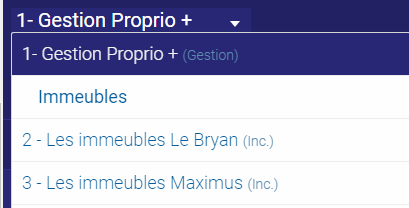
1. In the top-left selector, choose the company for which you want to create a unit.
ajouter un bail compagnie 1

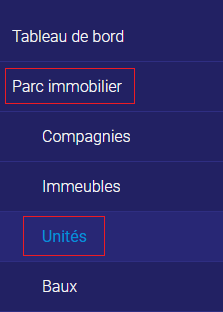
2. Go to the «Real Estate Park » tab and the « Units » sub-tab.
Comment changer la duree du renouvellement

3. Click on “Add” in the top right-hand corner.

unites ajouter

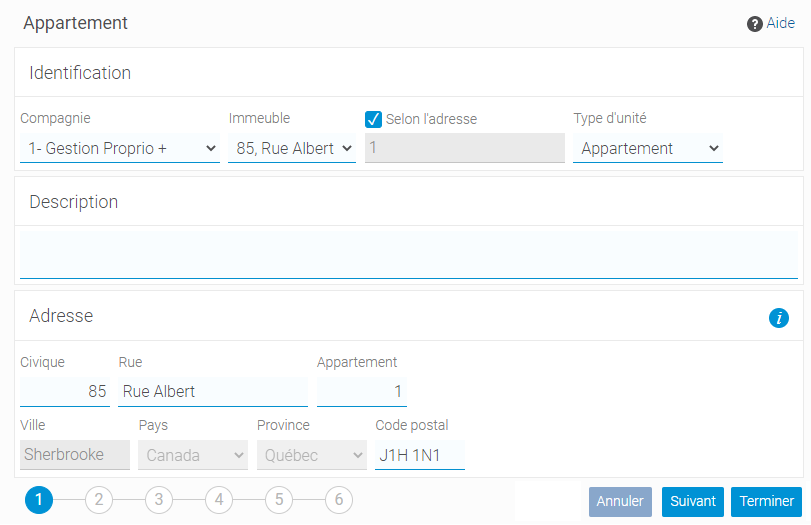
4. Enter the apartment number and any other information you deem necessary.
Unite

5. Click on “Finish”.

boutons 2

The unit is now created.

Tags:
  • 3 1/2
  • 4 1/2
  • 5 1/2
  • apartment
  • condominium
  • document
  • garage
  • house
  • local
  • locker
  • number of rooms
  • office
  • photo
  • price
  • room
  • unit
  • workshop

Articles populaires

  • How to Delete a Rent Payment
  • How to Enter an Expense
  • How to Create a Communiqué
  • Modifying Excel Cells
  • How to add a lease

Latest articles

  • November 2025 update
  • Updated September 2025
  • Update – May 28, 2025
  • Update May 7, 2025
  • Paying suppliers with Otonom solution

Property management software

About Us Any questions?

Proud Member

Follow us

  • Facebook
  • LinkedIn
  • YouTube
  • Instagram

© 2026 Proprio Expert | Privacy Policy | Terms and Conditions | Cookies Preferences

Created with passion by

Agence Standish

Scroll to top
  • Product
    • Operational management
    • Rental
    • Accounting and payments
    • Investment
  • Prices
  • Careers
  • Resources
    • Blog
    • Help Center
    • Contact Us
    • Owners
    • Tenants
  • FR

Free trial

Book your demo

Search